Who Follows Up After a Small-Business Phone Message?
Taking down a caller's message is only the beginning. A clear follow-up plan ensures the right person calls back with the right information—before business slips away.
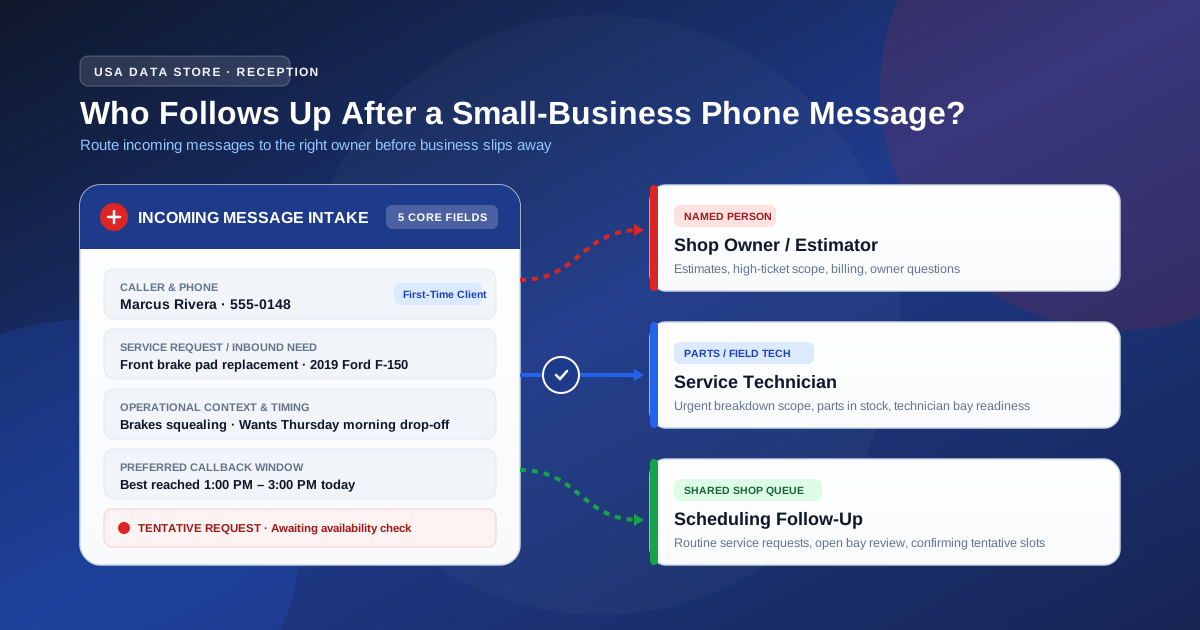
When an incoming call is answered, common questions are resolved, and a message or appointment request is captured, the initial reception job is done. But for the business owner, the real operational test has just begun.
Too often in a busy shop, salon, clinic, or local trade office, messages pile up in a shared inbox, on a sticky note, or inside a voicemail box. Staff assume someone else is handling it, or an owner glances at a phone number with zero context and puts off the callback until the end of the day. By then, the caller has often moved on to another business.
The direct answer is that a small business or local service owner determines follow-up ownership by classifying inbound requests into two clear paths: high-stakes service inquiries and custom estimates require a named individual (the owner or a designated lead specialist), while routine scheduling and general inquiries belong to a shared shop queue. To make follow-up work, every message must contain five essential pieces of context, and an appointment request must be treated as a tentative inquiry waiting for availability review rather than a confirmed booking.
Establishing this workflow does not require complex software, dedicated call-center dispatchers, or guaranteed response-time promises. It simply requires clear rules so that when the phone stops ringing, everyone on your team knows exactly who calls back and what they need to say.
1. Which messages need a named person vs. a shared shop queue?
In a small business, assigning every single callback to the owner creates an immediate bottleneck. Conversely, leaving every message to “the front desk” or “whoever has a free minute” ensures that critical, high-value inquiries get delayed.
The solution is establishing clear boundaries around message ownership based on the nature of the caller's request:
Messages requiring a named person
Certain inquiries involve business decisions, specialized pricing, or customer relationships that cannot be delegated to a general pool. These should be directed to a specific individual by name or job role:
- Custom estimates and high-ticket service quotes: When a homeowner or business client asks for a quote on a major project (such as a full roof replacement, major engine overhaul, or customized catering package), the callback requires technical assessment and pricing authority. Assign this directly to the estimator or owner.
- Complex customer concerns or billing disputes: An existing customer calling about an invoice discrepancy or dissatisfaction with a completed service needs an authoritative, empathetic response. Passing these messages to junior staff damages trust.
- Vendor, regulatory, or partnership calls: Calls from property managers, insurance adjusters, supply vendors, or legal contacts always belong to the owner or designated general manager.
Messages suited for a shared shop queue
Routine inquiries do not require executive decision-making. These can be picked up by any trained team member during standard operating hours:
- Standard service inquiries: Callers asking about everyday offerings with standard pricing (such as an oil change, haircut, routine checkup, or standard diagnostic fee).
- Routine appointment requests: Callers asking for open slots for standard services where availability rules are well established.
- General shop questions: Callers asking for directions, parking details, or order-ready status checks.
By sorting messages into these two streams, the business protects the owner's focus while ensuring routine callers receive prompt, capable attention from available staff.
2. What a usable small-business message must contain
A phone message that only says “John called about his car, call him back” is practically useless. It forces the person calling back to dial blind, completely unprepared for the customer's question, pricing expectations, or vehicle details.
A truly usable message provides enough context so the person following up can prepare the answer before dialing. Every captured message should contain five core fields:
| Field | Purpose | Example |
|---|---|---|
| 1. Caller Name & Verified Number | Ensures the callback reaches the right person on the correct device. | “Marcus Rivera, 555-0148” |
| 2. Relationship Status | Differentiates existing loyal clients from first-time callers. | “First-time customer (referred by neighbor)” |
| 3. Specific Service or Inbound Need | Clarifies the exact reason for the call so the team can prepare details. | “Needs front brake pad replacement and rotor inspection on 2019 Ford F-150” |
| 4. Operational Context & Urgency | Captures situational details that affect prioritization. | “Truck is driving but squealing loudly; hopes to drop off Thursday morning” |
| 5. Preferred Callback Window | Respects the caller's availability and prevents phone tag. | “Best reached between 1:00 PM and 3:00 PM today” |
When your front-line reception captures these five details, your team can pull the right record, check the parts inventory, or review the calendar before placing the callback. The conversation feels professional, respectful, and prepared from the very first hello.
3. How an appointment request differs from a confirmed booking
One of the most dangerous operational traps for a small business is confusing an appointment request with a confirmed booking.
When a customer calls and asks, “Can I come in Friday at 10:00 AM?”, they have initiated a request. If your staff or reception message treats that inquiry as a locked appointment without checking technician schedules, chair availability, or parts delivery, chaos follows:
- Two customers arrive at the same time expecting the same technician.
- A client shows up for a service that requires two hours when only a 30-minute window was open.
- Customers become frustrated when told their expected slot was never actually entered on the master shop calendar.
The operational distinction
- An appointment request is an intake inquiry: It gathers the customer's requested day, preferred time of day (morning vs. afternoon), specific service required, and contact details. It is an organized starting point that tells your team what the customer wants.
- A confirmed booking is a committed slot: It exists only after an authorized team member checks the actual calendar, verifies staff and bay availability, reserves the time, and communicates direct confirmation to the customer.
Setting caller expectations clearly
Your front-line reception should always be transparent about this distinction. Callers should be informed:
“We have your request for Friday morning for your brake service. Our service coordinator will check the shop schedule and follow up with you by phone to confirm your exact appointment time.”
This plain, honest phrasing eliminates misunderstandings. The customer knows their inquiry was received, understands that the slot is tentative, and knows that a personal confirmation call is coming.
(Note: USA Data Store does not promise real-time calendar syncing, third-party scheduling software integration, or guaranteed booking attendance. All scheduling commitments remain strictly under the small business's review and operational authority.)
4. Illustrative follow-up decision table: Message-to-owner card
To help small businesses organize their follow-up process, the following decision table outlines how incoming messages map to responsible team members and required next actions:
| Caller Scenario & Intake Details | Message Card Contents | Assigned Follow-Up Owner | Next Human Action | Follow-Up Guidance (No SLAs Implied) |
|---|---|---|---|---|
| High-Value Estimate Caller requesting a full transmission rebuild or major engine replacement. |
Caller name, phone, vehicle year/make/model, symptoms described, whether vehicle is drivable. | Shop Owner or Lead Estimator | Review diagnostic labor guidelines, look up part availability, and call customer with preliminary scope. | Review within the same business day when possible; prioritize before routine inquiries. |
| Routine Service Booking Request Caller asking for an oil change and tire rotation for Thursday morning. |
Caller name, phone, service requested, preferred day/time, vehicle model. | Front-Desk Coordinator or Shared Queue | Inspect bay schedule, select open slot, and call caller back to confirm exact drop-off time. | Contact customer during standard morning or afternoon desk review block. |
| Existing Customer Billing Question Client inquiring about an invoice discrepancy from last week's repair. |
Caller name, phone, invoice or repair order number, specific charge in question. | Office Manager or Business Owner | Pull signed repair order, verify technician hours and parts charged, and call back with explanation. | Handle directly; avoid delegating billing disputes to junior shop staff. |
| Part In-Stock Inquiry Caller asking if the shop carries a specific heavy-duty battery in inventory. |
Caller name, phone, part description or vehicle requirement. | Parts Desk or Any Available Tech | Check physical stock room or supplier catalog; call back with price and availability. | Address as schedule allows between active shop jobs. |
Important operational note: The table above is an illustrative planning aid designed to help small business owners structure their internal staff responsibilities. USA Data Store provides friendly inbound phone answering, message capture, and appointment intake; it does not provide an automated CRM integration, live calendar lock, or guaranteed callback response-time service level agreement (SLA).
5. Illustrative Scenario: Managing peak-season callbacks at an auto service shop
Illustrative Scenario
The following scenario illustrates how a local automotive repair shop organizes post-call follow-up ownership. It does not represent a specific business, live customer transcript, or guaranteed financial outcome.
Oakridge Auto Repair is a family-owned independent service shop with an owner-mechanic, two full-time technicians, and an office administrator. During seasonal tire-changeover and summer travel periods, the shop phone rings constantly while technicians are under vehicles with noisy impact wrenches.
Previously, calls went to a generic answering machine. At 5:30 PM, the owner would listen to eight garbled messages, scribble phone numbers on scrap paper, and try to remember who needed what. Half the callers had already booked with competitors.
To fix their follow-up process, Oakridge established three clear rules:
- Test Call A — The Breakdown Call: A caller phoned in on Tuesday morning because their SUV stalled on the highway and was being towed. The receptionist agent greeted the caller warmly, collected the driver's name, phone number, vehicle details, current tow company, and the symptom (“engine sputtered and died”). Because this was an urgent repair with towing involved, the message was marked for the Shop Owner. The owner received the message, recognized that a bay needed to be cleared for the tow truck, and called the customer back within 20 minutes to give tow drop-off instructions.
- Test Call B — The Maintenance Request: A caller asked if they could bring their sedan in on Friday for a routine 60,000-mile service. The intake agent recorded the caller's name, mileage, requested service package, and preference for Friday morning, noting clearly that this was an appointment request. This record went to the Shared Front-Desk Queue. During the 11:00 AM administrative desk block, the office administrator checked the Friday schedule, verified that an opening existed at 9:30 AM, and dialed the customer to confirm the booking.
- Test Call C — The General Question: A caller asked what brand of synthetic oil the shop carries and what the standard change fee was. The agent provided Oakridge's approved FAQ pricing and oil brand from the shop's profile. When the caller asked to think about it, the agent offered to take a message in case they wanted to schedule later. No follow-up action was needed from the owner.
By establishing clear ownership paths, Oakridge eliminated missed messages and ensured that urgent callers received personal owner attention while routine scheduling was handled smoothly by administrative staff.
6. Setting up approachable reception with USA Data Store
Running a small business is demanding enough without losing business to missed calls or disorganized messages. USA Data Store gives local businesses an approachable, dependable front line for incoming phone calls:
- Greets every caller warmly: Answers your line 24/7 with your business name and a friendly, professional greeting.
- Answers approved common questions: Shares your verified hours, location, standard services, and pricing basics as outlined in our reception checklist for common calls.
- Captures structured message and booking requests: Collects caller details, service needs, and preferred timing as discussed in our pre-booking call guide, so your team has complete context before calling back.
- Supports human handoff: Enables callers with complex inquiries to reach a person or leave an organized message for the owner.
Transparent service terms and simple onboarding
USA Data Store is built specifically for small storefronts, local trades, and service shops—not complex enterprise environments:
- Sales-assisted initial setup: A representative works with you to establish your initial call flow, configure your business information, and set up your approved questions and message preferences.
- In-platform ongoing edits: You can update your business hours, pricing answers, and reception rules directly in the platform at any time, with support available for additional assistance.
- Simple, predictable subscription: The standard AI Phone Agent subscription is $199 per month (billed month to month, with $0 setup or onboarding fees). Each monthly billing period includes 500 inbound voice minutes and 500 SMS text messages. Additional usage is billed at $0.12 per minute and $0.02 per SMS. You can cancel before the end of any billing period to prevent renewal.
Keep your front door open and ensure every caller gets a clear, friendly next step. Learn more on our How It Works page, review our Small-Business FAQ, or talk through your call flow with USA Data Store today.